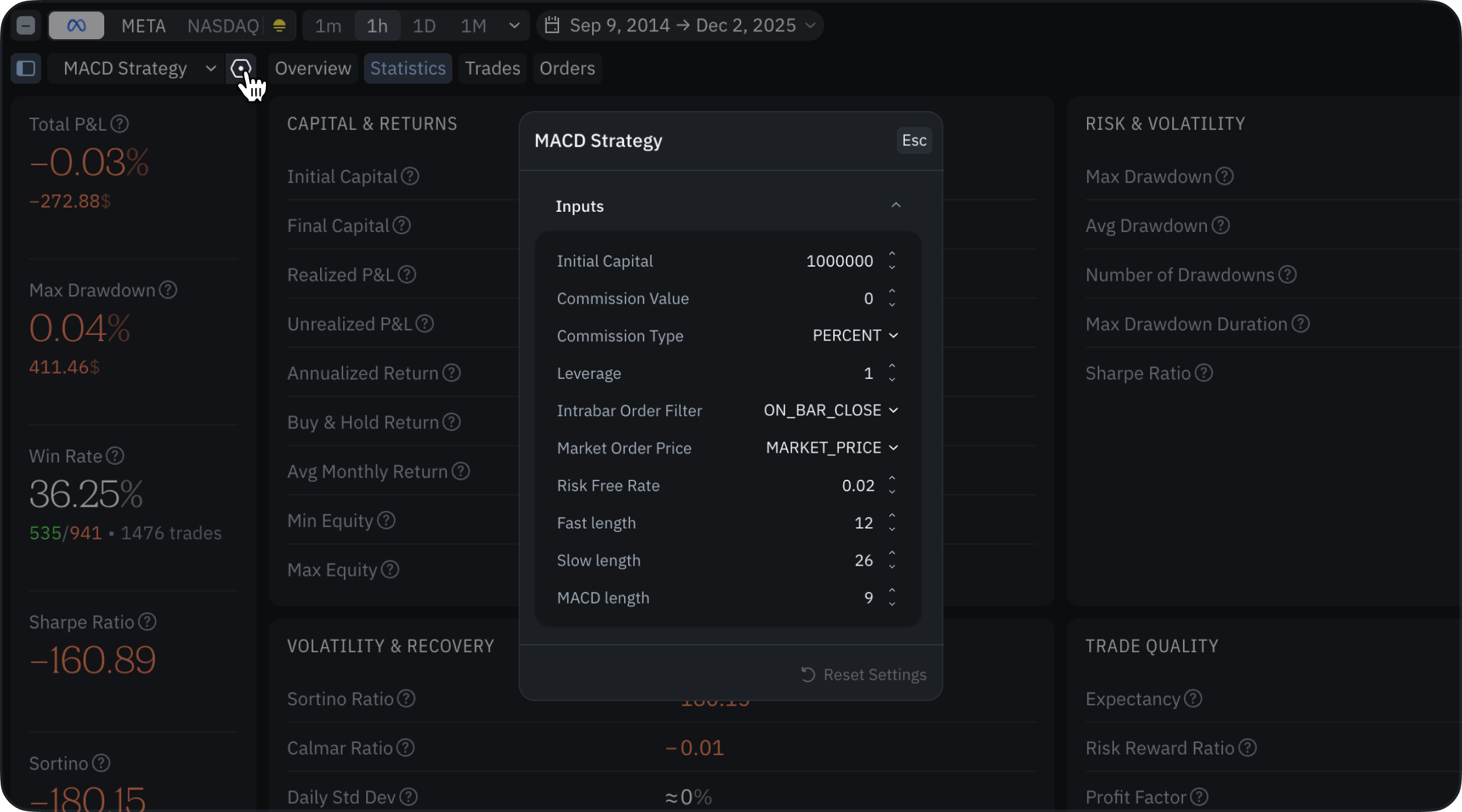
Strategies have a variety of parameters that allow you to fine-tune their behavior, appearance, and execution logic. These parameters are defined using the @strategy decorator. Some parameters are identical to those used in the @indicator decorator and serve the same purpose for both indicators and strategies. However, there are also specific parameters designed exclusively for strategies, such as those controlling commission and leverage, and other execution settings.

Parameters

Basic script parameters

These parameters work the same way as they do for regular indicators:
  • abbrev_title — a short title for the strategy
  • overlay_main_pane — whether the strategy is overlaid on the main chart pane
  • format — specifies the format of the output values displayed on the chart
  • precision — sets the precision of the output values displayed on the chart

Strategy and backtesting parameters

These parameters are important for simulating realistic trading conditions and evaluating the performance of your strategy. They allow you to configure aspects like initial capital, transaction costs, and how orders are handled during strategy execution. Let’s first look at the general syntax for configuring strategy parameters, and then analyze each parameter separately. Common parameters syntax:
from indie import strategy, format
from indie.strategies import Commission, commission_type, intrabar_order_filter, market_order_price

@strategy(
    # Basic script parameters
    abbrev_title='MyStrategy',
    overlay_main_pane=True,
    format=format.CURRENCY,
    precision=2,
    # Strategy and backtesting parameters
    initial_capital=5000000.0,
    commission=Commission(0.1, commission_type.FIXED),
    leverage=4.2,
    intrabar_order_filter=intrabar_order_filter.ON_BAR_CLOSE,
    market_order_price=market_order_price.ORDER_CREATION_PRICE,
    risk_free_rate=0.03,
)
def Main(self):
    # Define strategy logic here
    pass
  • initial_capital - the initial capital allocated for the strategy. If the strategy does not have enough money (and enough leverage) to execute an order, the order will be transferred to the REJECTED status. Write strategies so that they take into account your existing cash and the cost of securities. For example:
# indie:lang_version = 5
from indie import strategy
from indie.strategies import order_side

@strategy('Simple Buy Strategy', initial_capital=100000.0)
def Main(self):
    # Calculate order size as 10% of available cash
    order_size = self.trading.cash * 0.1 / self.close[0]
    
    # Buy if we have enough cash
    if self.trading.cash > 0:
        self.trading.place_order(order_side.BUY, size=order_size).submit()
  • commission - defines the order execution commission for the strategy. It can be specified as a percentage of the order value (e.g., 0.2% is written as 0.002) or as a fixed amount per order.
from indie import strategy
from indie.strategies import Commission, commission_type

# Percentage-based commission (0.1% of order value)
@strategy('Strategy with Percent Commission', 
          commission=Commission(0.001, commission_type.PERCENT))
def Main(self):
    pass

# Fixed commission ($2 per order)
@strategy('Strategy with Fixed Commission', 
          commission=Commission(2.0, commission_type.FIXED))
def Main(self):
    pass
  • leverage - the leverage applied to the strategy. If set to 1.0 (the default), the strategy trades only with its own funds, without margin.
from indie import strategy

# No leverage - trade only with own funds
@strategy('No Leverage Strategy', leverage=1.0)
def Main(self):
    pass

# 4x leverage - can open positions up to 4 times the capital
@strategy('Leveraged Strategy', leverage=4.0)
def Main(self):
    pass
  • intrabar_order_filter - specifies the filter for intrabar orders.
Strategy calculations are triggered on every price update, not only at bar close. Many strategies do not need to place orders multiple times within the same bar, which often forces you to write additional logic to track intrabar updates. To simplify strategy code, we provide several pre-configured filtering options that handle these cases automatically. Read more in the backtesting mechanics section. For now, let’s just look at the syntax of this parameter:
# indie:lang_version = 5
from indie import strategy, MainStrategyContext
from indie.strategies import Commission, commission_type, intrabar_order_filter
from indie.strategies import order_side, market_order_price


@strategy('Strategy Parameters Example',
          overlay_main_pane=True,
          commission=Commission(0.002, commission_type.FIXED),
          initial_capital=100000.0,
          intrabar_order_filter=intrabar_order_filter.NO_FILTER,
          market_order_price=market_order_price.ORDER_CREATION_PRICE)
class Main(MainStrategyContext):
    def __init__(self):
        pass

    def calc(self):
        pass
  • market_order_price - determines the price for market orders.
This is another useful mechanism that allows you to control the price at which market orders are executed. An example of use can be found above, and for more information, see the backtesting mechanics section.
  • risk_free_rate - the risk-free rate used in statistics calculations. This only affects the calculation of statistics (Sharpe ratio), but not the operation of the strategy.

UI configuration

The parameter values specified in the code will be the default values for your strategy. All these parameters can be configured not only in code but also through the UI before launching the strategy. UI configuration