

What You Get
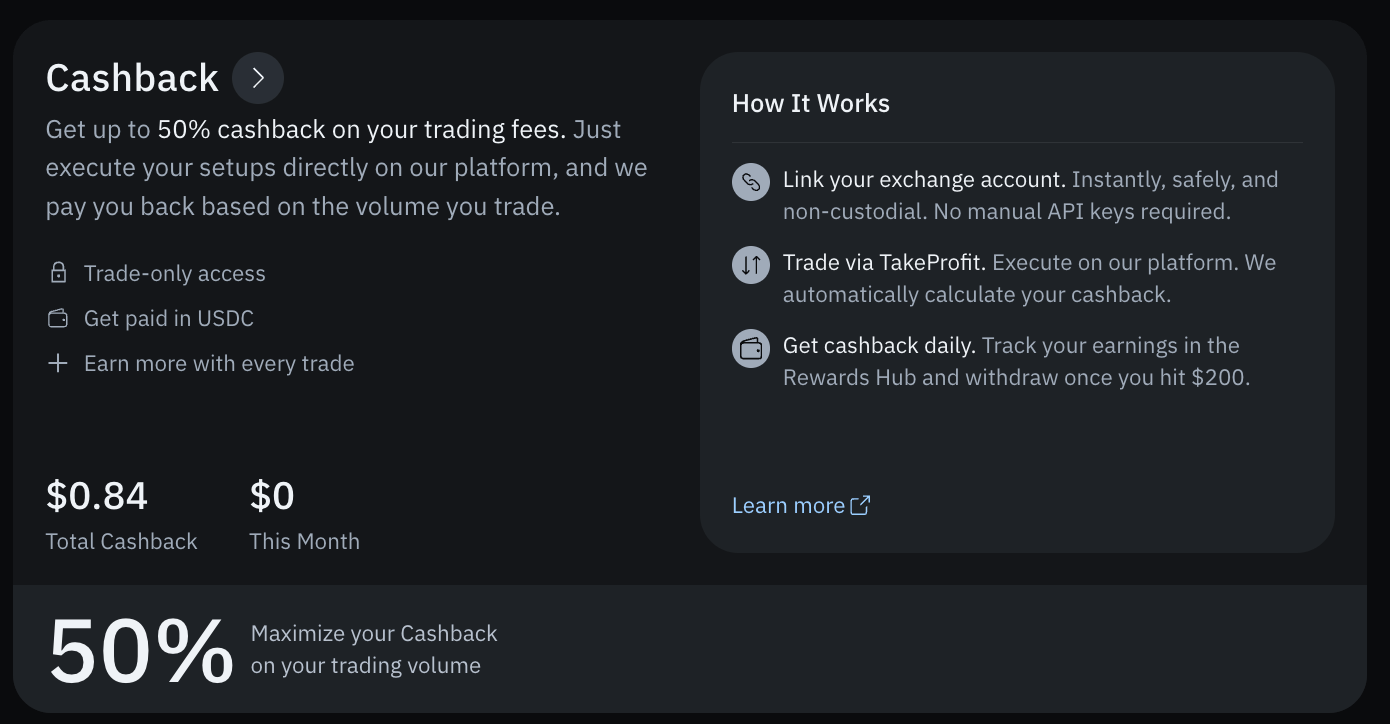
- Up to 50% cashback on the trading fees you pay.
- Daily USDC credits directly to your Cash Rewards balance.
- Tracking on your trade volume when you execute via our terminal.
- Safe, non-custodial connection using secure OAuth with zero manual API keys required.
How Much Cashback You Get
New to cashback? Here’s the whole idea: every time you trade, the exchange charges a small trading fee. Cashback gives you part of that fee back as USDC. Your rate depends on a single thing — who your Bybit account is affiliated with:
If your account is tied to another Bybit partner, changing your referrer to TakeProfit is what moves you from 10% up to 50%.
There is no minimum commission threshold. Every trade earns your full rate no matter how small the fee the exchange charged, and the same rate applies to both Spot and Futures trading.
Eligible account tiers
Cashback covers VIP 0 – VIP 99 and PRO 1 – PRO 3 accounts.Example. Your Bybit account was created through TakeProfit and sits on VIP 2, so your rate is 50%. Every spot and futures trade you execute in the terminal returns 50% of the fee you paid in USDC — whether that fee was large or tiny.
Supported Exchanges and Brokers
Bybit
Available now. Connect your account and start earning up to 50% cashback on your trading fees.
Exness
Coming soon.
How to Activate Cashback
- Open the Rewards Hub and navigate to the Cashback section.
- Under Connected Exchanges, click Connect on Bybit.
- Choose your connection method:
- Fast Connect — securely link your account via OAuth with zero manual API keys required.
- API Keys — manually paste your Bybit API keys if preferred.
- Select your account type to determine your cashback tier:
- 50%: Connect an existing account that has no affiliate, or one where TakeProfit is already your affiliate. You can also create a new Bybit account through the TakeProfit link.
- 10%: Connect an account that is already affiliated with another partner inside Bybit. Switching your referrer to TakeProfit moves you up to 50%.
- Start trading: execute your setups directly in the TakeProfit terminal, and your cashback will begin crediting to your Cash Rewards balance.
How to Create a Bybit Account via TakeProfit
Don’t have a Bybit account yet? Create one straight from our Connect flow — it automatically attaches the TakeProfit referral code, so your new account starts on the 50% Cashback rate from your very first trade.- Open the Connect flow: In the Rewards Hub, go to the Cashback tab and click Connect next to Bybit. A Bybit window opens: “Log in to your Bybit account and continue to TakeProfit.com.”
- Switch to Sign Up: Since you’re creating a new account, click Sign up next to “New to Bybit?”.
-
Register your account: On the “Register your Bybit account” screen, enter your email or mobile number. Your Referral Code is already filled in automatically — leave it as is, since it registers the account under TakeProfit and puts you on the 50% Cashback rate. Accept the Terms of Service and Privacy Policy, then click Create Account.
Keep the pre-filled Referral Code. If you replace it with another partner’s code, your new account becomes affiliated with them and drops to the 10% rate.
- Complete sign-up on Bybit: Finish Bybit’s registration, verify your identity (KYC), and fund your new account.
- Link back to the terminal: Once your Bybit account is active, return to TakeProfit and use Fast Connect (OAuth) to instantly bind the newly created account.
- Verify your tier: Check your Account widget or the Rewards Hub dashboard to confirm your status shows the active 50% Cashback rate.
How to Change Your Bybit Referrer to TakeProfit
This one is for accounts that are already affiliated with another Bybit partner — the accounts stuck on the 10% rate. Transferring your Bybit identity to a new account registered under the TakeProfit referral link moves you up to 50%.If your account has no affiliate at all, you’re already on the 50% rate — just connect it. You don’t need this procedure.
- Create your new account — click Sign Up to register a Bybit account through TakeProfit’s link.
- Navigate to identity settings — log into your old, KYC-verified Bybit account, head to Account & Security, and open Identity Verification.
- Initiate transfer — click the Identity Transfer button in the top right corner of the page.
- Pass security checks — complete the required facial recognition or security code verification, review Bybit’s terms, and click Continue.
- Link the new account — enter the email or phone number of the new Bybit account you registered under TakeProfit, then click Next.
- Confirm — enter the security verification code sent via SMS/Email to finalize.
Important Notes
- Lock periods — Bybit restricts withdrawals, fiat operations, and further identity transfers for 24 hours after the transfer completes.
- Account limits — Bybit allows an identity transfer only once every 180 days.
- Clean slate — Make sure your old Bybit account has no active P2P orders, listings, or linked bank cards. Deactivate your Bybit card if you have one.
- Platform — This process can only be done on the desktop/web version of Bybit on a PC.
Tracking Your Cashback
Order Entry. With a Bybit account connected, the form shows the estimated cashback the order will earn if it fills — both in the fee currency and in USD. Alongside it you get a shortcut that depends on your rate: at 10%, a Get 50% link explaining how to move up; at 50%, Track Rewards, which opens your rewards page. With no Bybit account connected, that spot holds a Trade & Earn block instead — Get up to 50% back on trading fees — with a Connect Bybit Account button that opens the connection window, and a Learn More link that opens this page in a new tab. Account widget. The account summary shows your current active rate (for example, Cashback · 10%) alongside a Get 50% link to upgrade to the maximum rate, and the cashback earned on that account so far.
- They refresh once an hour, so a trade you just closed shows up in the next update rather than immediately.
- When the amount is small enough to round down to
0.00, hover the Cashback column to see the full value. The amount was credited — it is just smaller than the two decimals can show.
Withdrawing Your Cashback
Cashback automatically credits to your Cash Rewards balance daily. To claim your earnings, click Payout in the Rewards Hub once your balance reaches the $200 minimum. This sends a request to our support team, who process withdrawals manually — you can also reach them directly at support@takeprofit.com. Payouts are issued in USDC.Disconnecting an Exchange
If you choose to disconnect an account, TakeProfit will immediately stop:- Syncing your positions, open orders, and account balances.
- Executing trades and running any active bots on that specific account.
- Accruing new Cashback on your trades.
- On the exchange: Your open positions and orders remain active directly on the exchange — disconnecting your account from TakeProfit will not close or cancel them.
- In your hub: Your historic Cashback data and accrued Cash Rewards balance stay securely in your account.
FAQ
What is Cashback?
What is Cashback?
Cashback gives you back up to 50% of the trading fees you pay. Instead of paying full execution costs to an exchange, trading directly through our platform allows you to trade and earn a portion of those fees back as real money paid directly by TakeProfit.
Which exchanges and brokers support Cashback?
Which exchanges and brokers support Cashback?
Bybit is fully supported right now via secure, non-custodial integration. Exness is coming next, and more exchanges and brokers will follow.
How do I connect my exchange or broker account to start earning?
How do I connect my exchange or broker account to start earning?
Simply select your exchange or broker and choose your preferred connection method — you can link your account instantly via secure OAuth or by manually entering your API keys.
What is the difference between the 50% and 10% cashback tiers?
What is the difference between the 50% and 10% cashback tiers?
It comes down to who your Bybit account is affiliated with:
- 50%: Your account has no affiliate, or TakeProfit is your affiliate. This is the standard rate for most traders.
- 10%: Your account is already affiliated with another Bybit partner. To move up to 50%, change your referrer to TakeProfit.
Do trades I place directly on the Bybit website or mobile app count toward cashback?
Do trades I place directly on the Bybit website or mobile app count toward cashback?
No. To qualify for Cashback rewards, trades must be executed directly in TakeProfit’s terminal.
Why did some of my trades earn less or no cashback?
Why did some of my trades earn less or no cashback?
There is no minimum commission threshold — small fees are not excluded, and Spot and Futures are treated the same. If a trade earned less than you expected, it’s usually one of these:
- Your account is on PRO 4 – PRO 6. These tiers are excluded from Cashback entirely.
- Your account is affiliated with another Bybit partner. That puts you on the 10% rate instead of 50%.
- The trade wasn’t executed in the TakeProfit terminal. Only trades placed through our terminal qualify.
- The exchange charged no fee on that trade. Cashback is a share of the fee you actually paid, so a zero-fee trade has nothing to share back.
Does TakeProfit have access to my exchange funds?
Does TakeProfit have access to my exchange funds?
No. The platform connection is strictly scoped to trade execution and fee data tracking. TakeProfit never has withdrawal or transfer access to your funds; your capital completely remains inside your own secure exchange account the entire time.
Does using Cashback affect my exchange VIP tiers or fee discounts?
Does using Cashback affect my exchange VIP tiers or fee discounts?
Not at all. There are no price markups or fee downgrades. You keep your standard exchange pricing structure and your exact VIP tier status — Cashback simply stacks on top, directly lowering your effective execution costs.Your tier does decide whether you’re eligible in the first place: VIP 0 – VIP 99 and PRO 1 – PRO 3 accounts earn Cashback, while PRO 4 – PRO 6 accounts are excluded.
What is the difference between 'Estimated' and 'Available for Payout'?
What is the difference between 'Estimated' and 'Available for Payout'?
- Estimated: Rewards currently in a waiting period or under a verification hold (this includes a standard 1-day processing delay for recent trade cashback to clear and a 60-day holding period for posts and indicators).
- Available for payout: Fully cleared money that is ready to withdraw right now.
What is the minimum payout amount?
What is the minimum payout amount?
The minimum payout threshold is $200. Once your cleared Total Balance reaches this amount, you are fully eligible to request a withdrawal.
How do payouts work?
How do payouts work?
Payouts are processed by request directly through your dashboard, issued in Crypto (USDC), and handled manually by our team. Before your first payout, we may ask you to verify your identity.