> ## Documentation Index
> Fetch the complete documentation index at: https://takeprofit.com/docs/llms.txt
> Use this file to discover all available pages before exploring further.
# Trading (Beta)
TakeProfit now supports **direct trading from the chart** via exchange integration. You can connect your exchange account, place orders, and manage positions without leaving your workspace.
Trading is currently available for derivatives markets and supported exclusively via **Bybit**. Support for **Binance** and additional exchanges will be added soon, and updates will be published as they go live in production.
***
## Earn Cashback with TakeBack
When you trade on a connected exchange, you can earn **up to 50% of your trading fees back** through **TakeBack**, TakeProfit's cashback program. Create a new Bybit account through TakeProfit for the full **50%**, or link an existing account for **25%** — then trade as usual and your cashback accrues automatically.
Learn more in the [TakeBack guide](https://takeprofit.com/docs/guide/monetization-tools/rebates).
***
## Getting Started
### 1. Open Order Panel
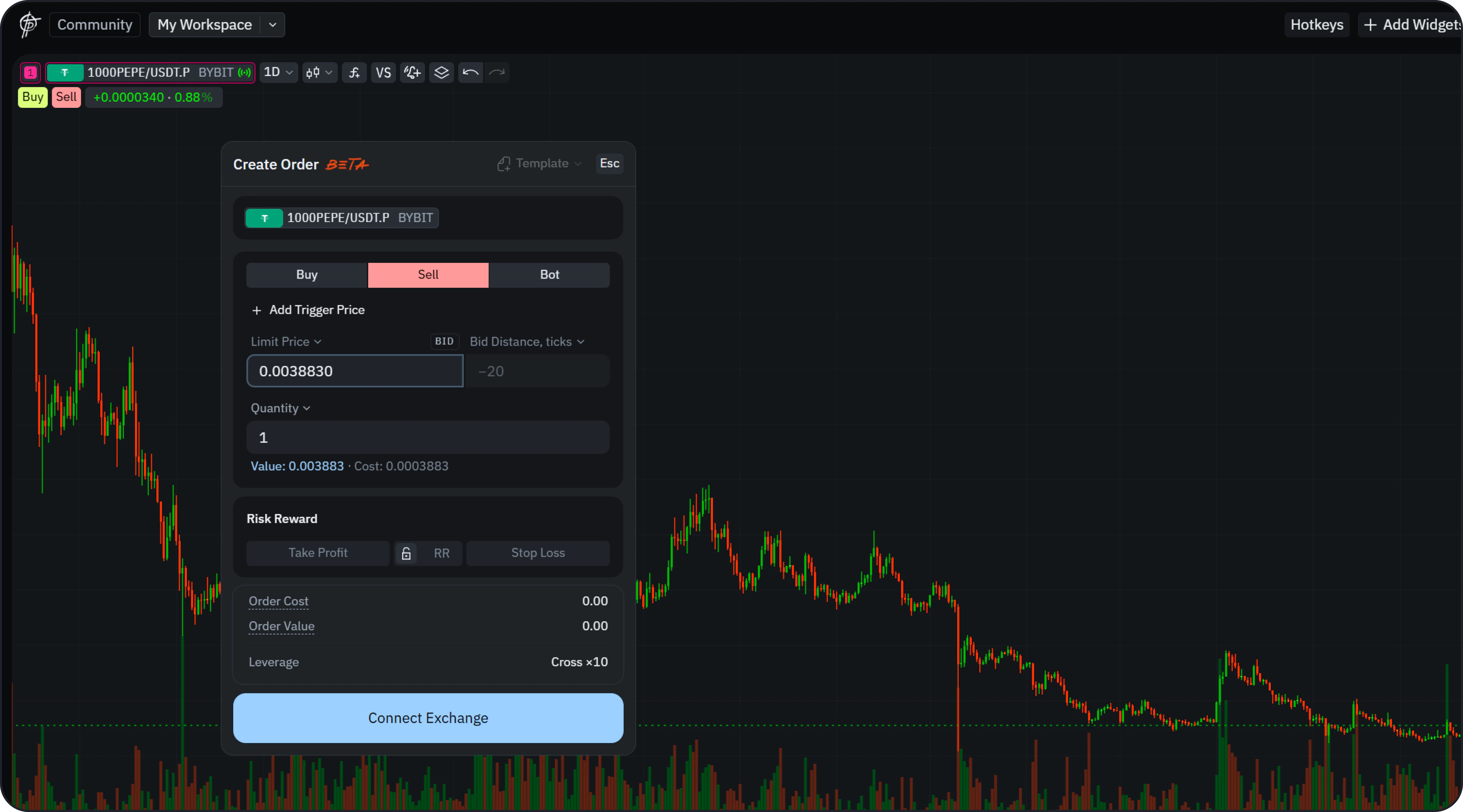 Click the **Buy** or **Sell** button in the top-left corner of the chart.
This will open the **Create Order** panel.
***
### 2. Connect Exchange Account
Click the **Buy** or **Sell** button in the top-left corner of the chart.
This will open the **Create Order** panel.
***
### 2. Connect Exchange Account
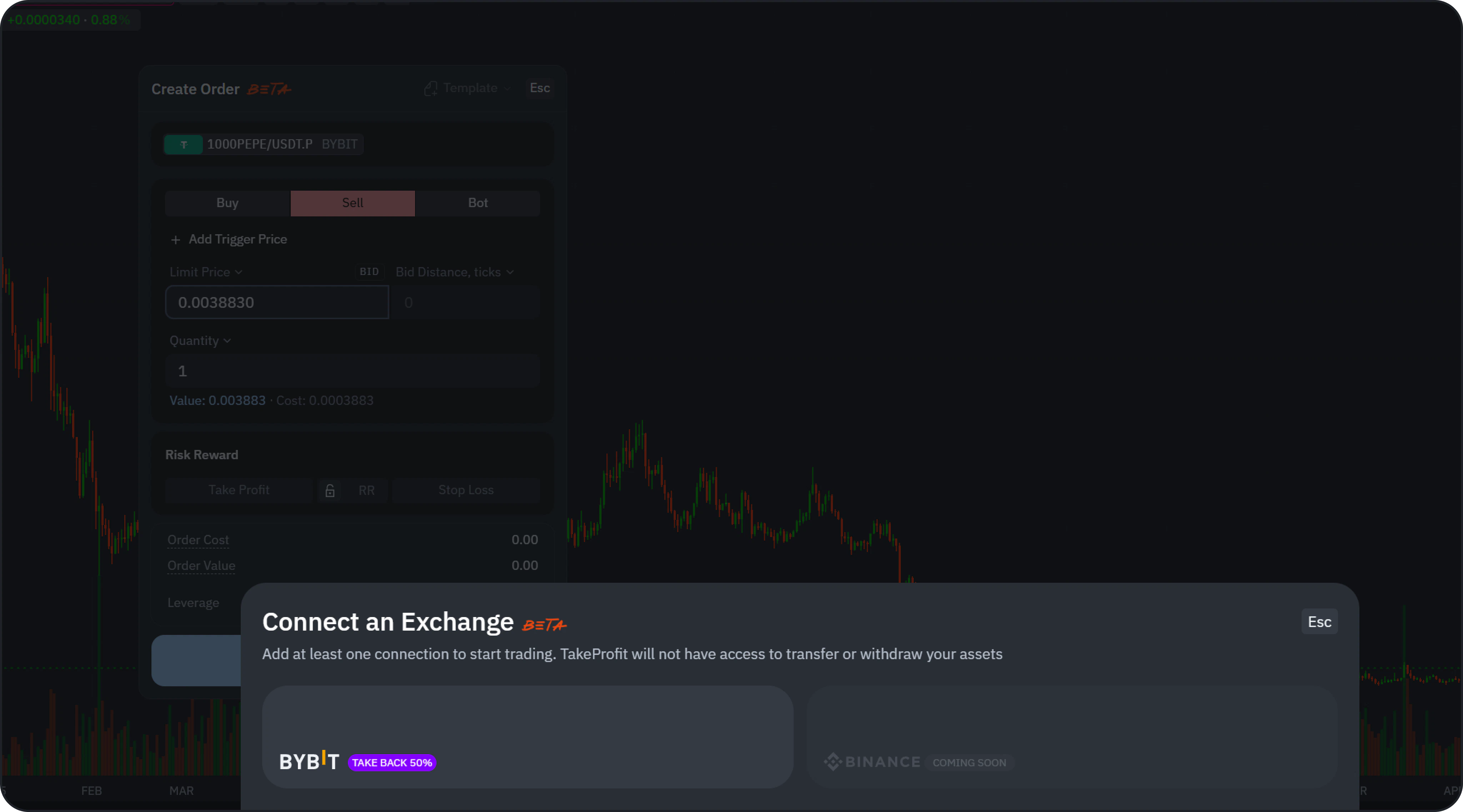 If an account isn't connected, you will be prompted to link one.
You can also:
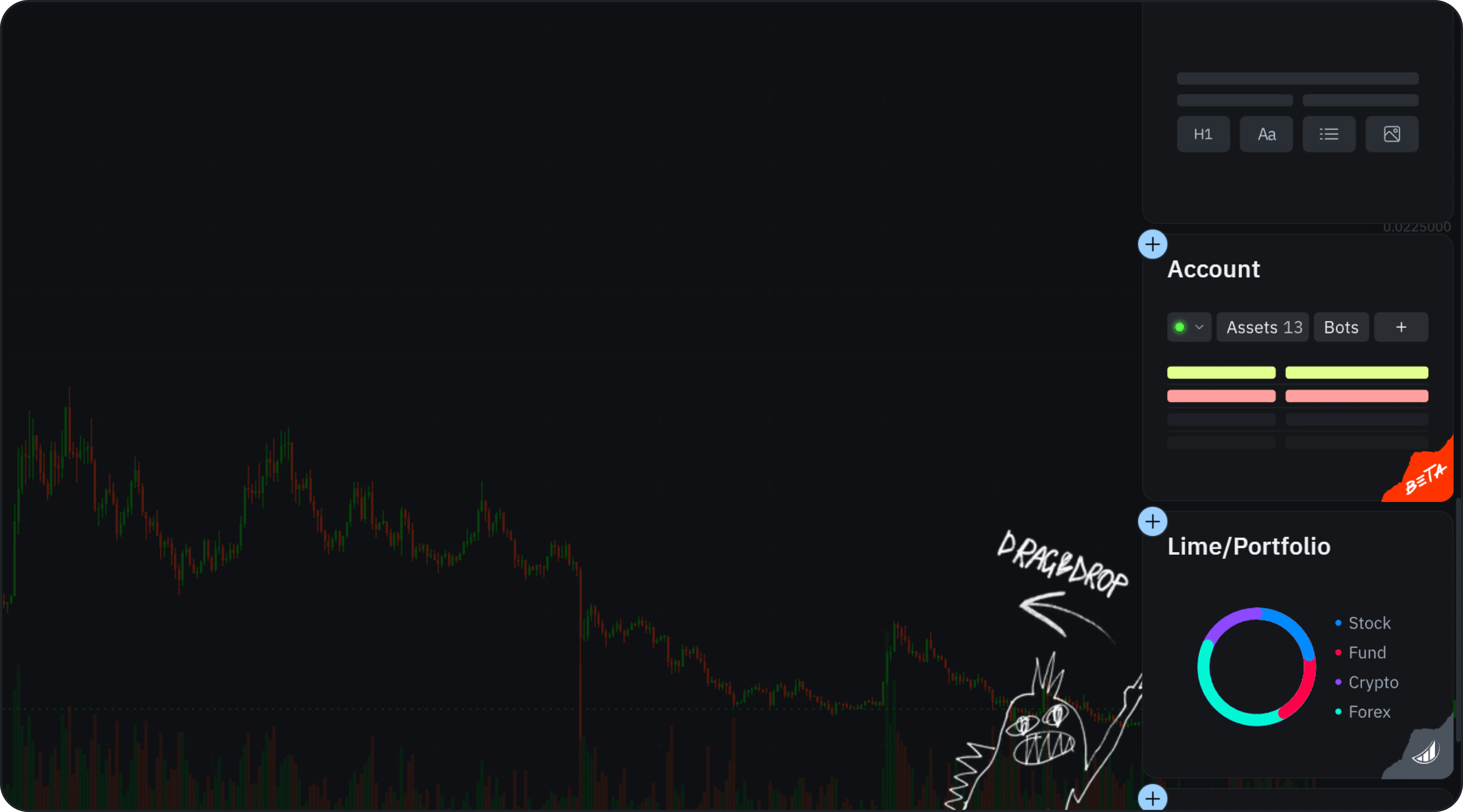
* Click **Add Account** directly.
* Add the **Account Widget** via **Add Widgets**.
If an account isn't connected, you will be prompted to link one.
You can also:
* Click **Add Account** directly.
* Add the **Account Widget** via **Add Widgets**.
 ***
### 3. Connect
***
### 3. Connect
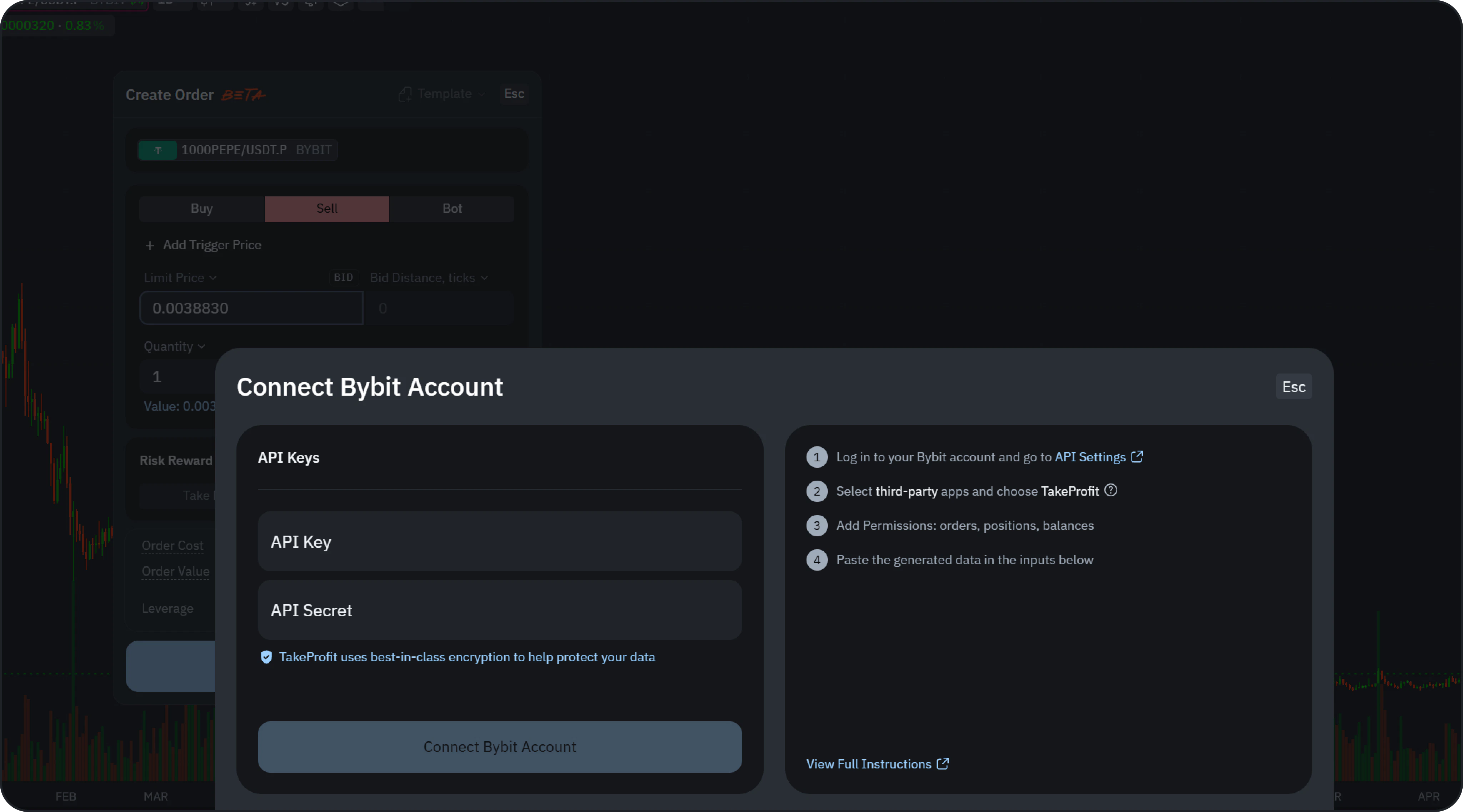 You can connect in two ways:
* **Fast Connect** — link your Bybit account in a few clicks. Create a new account for a **50%** TakeBack rebate, or link an existing one for **25%**.
* **API Keys** — connect manually with your own API keys, as described below.
To connect with **API Keys**:
1. Open the **API Settings** in your Bybit account.
You can connect in two ways:
* **Fast Connect** — link your Bybit account in a few clicks. Create a new account for a **50%** TakeBack rebate, or link an existing one for **25%**.
* **API Keys** — connect manually with your own API keys, as described below.
To connect with **API Keys**:
1. Open the **API Settings** in your Bybit account.
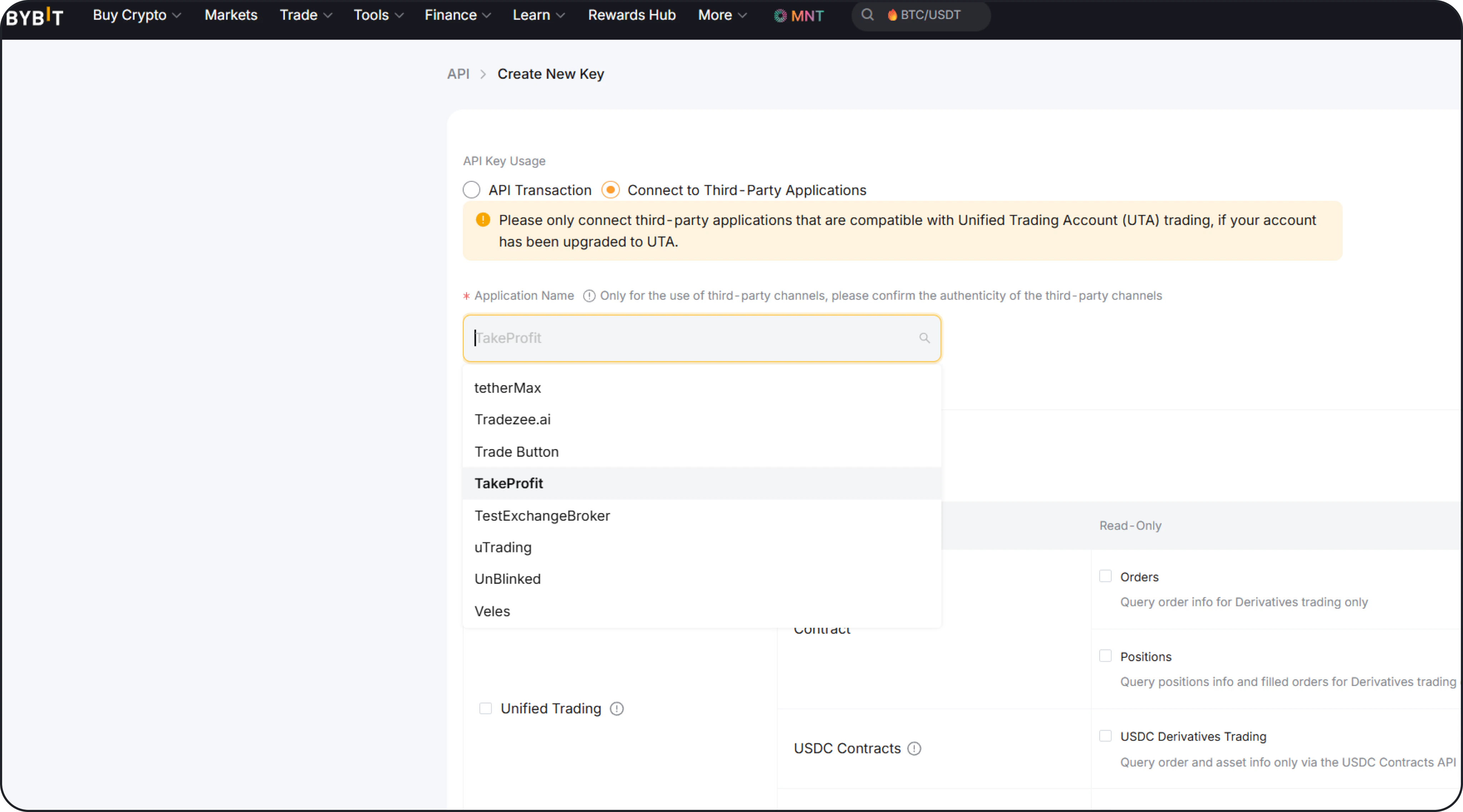 2. Create a new API key.
3. Enable:
* Orders
* Positions
* Balance
4. Copy:
* API Key
* API Secret
5. Paste them into TakeProfit and click **Connect**.
6. After a successful connection, your account data will automatically sync.
***
## Create an Order
The order form allows you to configure and submit trades directly to the exchange.
### Supported Order Types
* **Market Order**
* **Limit Order**
***
### Basic Parameters
* **Side**: Buy / Sell
* **Price**: Manual input or chart-based adjustment
* **Quantity**: Position size
* **Order Value / Cost**: Auto-calculated
* **Time in Force**: Good Till Cancelled (GTC)
***
### Trigger Price (Conditional Logic)
You can optionally enable **Trigger Price**:
* **Last Price** — based on latest trade price
* **Mark Price** — fair price used to reduce liquidation spikes
* **Index Price** — aggregated price across exchanges
***
### Risk Management
2. Create a new API key.
3. Enable:
* Orders
* Positions
* Balance
4. Copy:
* API Key
* API Secret
5. Paste them into TakeProfit and click **Connect**.
6. After a successful connection, your account data will automatically sync.
***
## Create an Order
The order form allows you to configure and submit trades directly to the exchange.
### Supported Order Types
* **Market Order**
* **Limit Order**
***
### Basic Parameters
* **Side**: Buy / Sell
* **Price**: Manual input or chart-based adjustment
* **Quantity**: Position size
* **Order Value / Cost**: Auto-calculated
* **Time in Force**: Good Till Cancelled (GTC)
***
### Trigger Price (Conditional Logic)
You can optionally enable **Trigger Price**:
* **Last Price** — based on latest trade price
* **Mark Price** — fair price used to reduce liquidation spikes
* **Index Price** — aggregated price across exchanges
***
### Risk Management
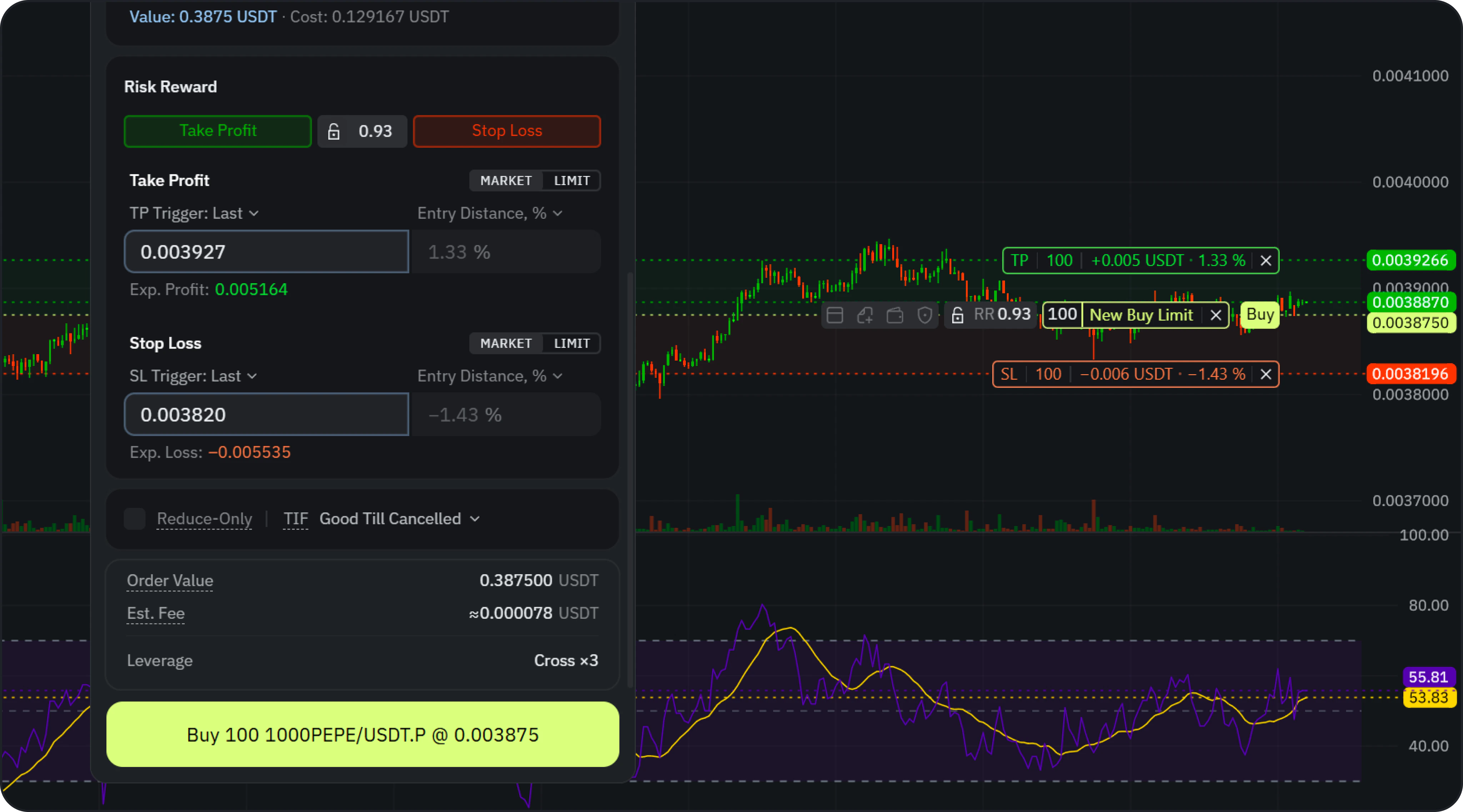 Before execution, configure your basic risk controls:
* **Take Profit**
* **Stop Loss**
* **Risk/Reward (RR)**
These parameters can be set directly in the order form or visually adjusted on the chart.
***
### Reduce-Only
Enable **Reduce-Only** to ensure the order strictly reduces or closes an existing position without accidentally opening a new one.
***
### Confirmation
Before submission, a confirmation modal will display:
* Order Price
* Quantity
* Order Cost
* Order Value
* Estimated Fee (approximate, based on exchange data)
* TP/SL levels
* Leverage
Click **Confirm** to send the order to the exchange.
***
## Chart Trading
Manage positions directly on the chart by:
* Dragging price levels to adjust your entry.
* Setting Take Profit and Stop Loss levels.
* Viewing RR ratios and position levels.
***
## Account Data & Tracking
Before execution, configure your basic risk controls:
* **Take Profit**
* **Stop Loss**
* **Risk/Reward (RR)**
These parameters can be set directly in the order form or visually adjusted on the chart.
***
### Reduce-Only
Enable **Reduce-Only** to ensure the order strictly reduces or closes an existing position without accidentally opening a new one.
***
### Confirmation
Before submission, a confirmation modal will display:
* Order Price
* Quantity
* Order Cost
* Order Value
* Estimated Fee (approximate, based on exchange data)
* TP/SL levels
* Leverage
Click **Confirm** to send the order to the exchange.
***
## Chart Trading
Manage positions directly on the chart by:
* Dragging price levels to adjust your entry.
* Setting Take Profit and Stop Loss levels.
* Viewing RR ratios and position levels.
***
## Account Data & Tracking
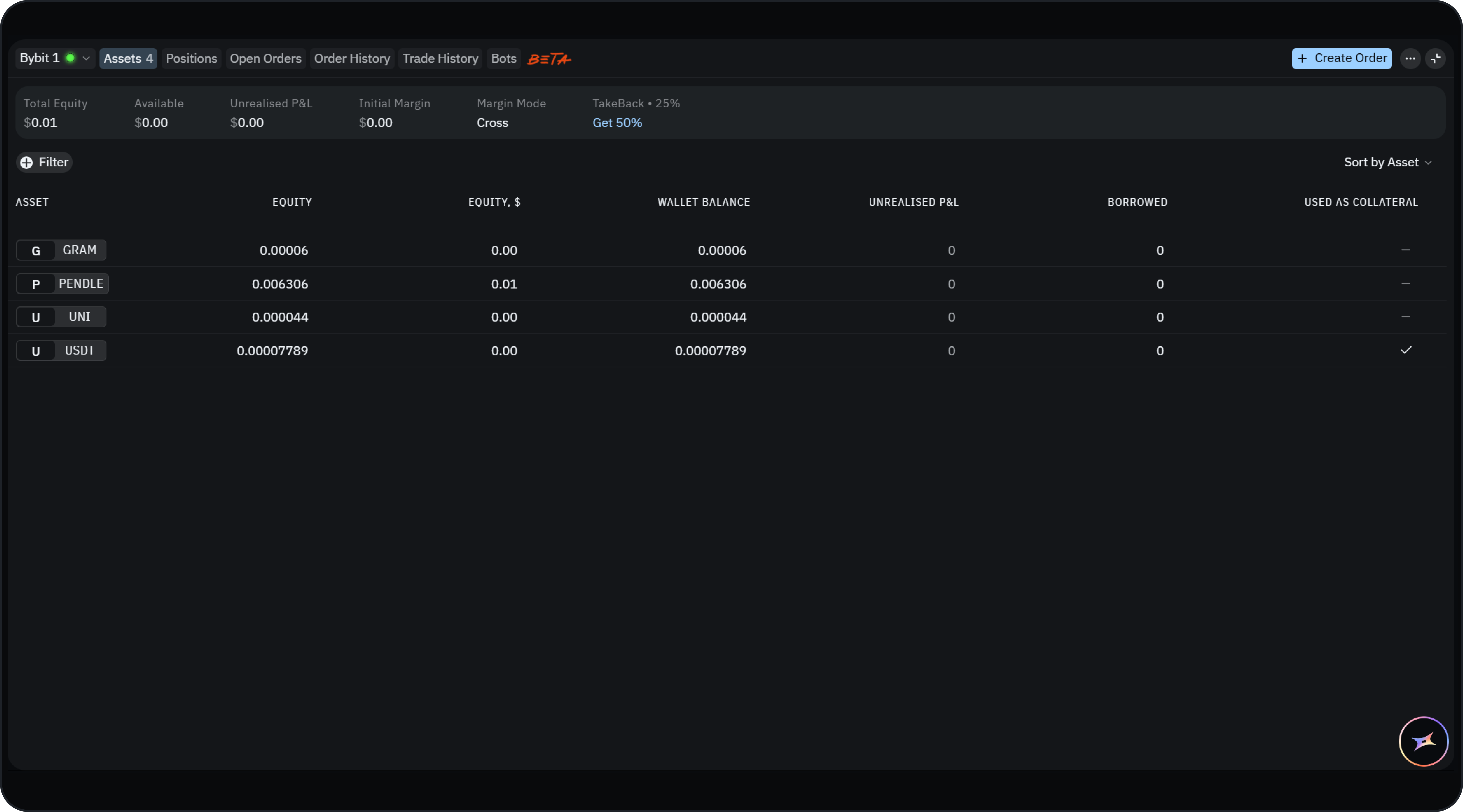 After connecting your account, you can monitor trading activity in the **Account Widget**.
### Available Data
* **Total Equity**
* **Available Balance**
* **Unrealized PnL**
* **Margin Mode**
***
### Tabs
* **Assets** — Balance per asset
* **Positions** — Active positions
* **Open Orders** — Active orders
* **Order History** — Completed orders
* **Trade History** — Execution history
***
### Exchange Sync
All data is bi-directionally synchronized:
* Orders created on TakeProfit appear on the exchange
* Orders and positions created directly on the exchange are also reflected in the platform
***
## Margin & Leverage
You can configure:
* **Margin Mode** (e.g. Cross / Isolated)
* **Leverage**
These changes apply to your positions according to the specific rules of your connected exchange.
***
## Limitations (Beta)
Trading is currently in **Beta**.
*Please note the following limitations:*
* Only derivatives are fully supported.
* Only **One-Way mode** is supported (no Hedge Mode).
* **Stop Market / Stop Limit orders** are not currently supported.
* **Order editing is not available** (orders can only be canceled).
* Account metrics (e.g. equity, buying power) may not update in real time.
* Advanced validations and presets are still in progress.
* Order form settings are not saved between sessions.
* Estimated fees are **approximate**, based on exchange calculations.
* Additional exchanges (e.g. Binance) will be supported in future [updates](https://takeprofit.com/docs/guide/changelog).
* **Bybit EU (bybit.eu) is not supported**. Use a standard Bybit account to connect.
After connecting your account, you can monitor trading activity in the **Account Widget**.
### Available Data
* **Total Equity**
* **Available Balance**
* **Unrealized PnL**
* **Margin Mode**
***
### Tabs
* **Assets** — Balance per asset
* **Positions** — Active positions
* **Open Orders** — Active orders
* **Order History** — Completed orders
* **Trade History** — Execution history
***
### Exchange Sync
All data is bi-directionally synchronized:
* Orders created on TakeProfit appear on the exchange
* Orders and positions created directly on the exchange are also reflected in the platform
***
## Margin & Leverage
You can configure:
* **Margin Mode** (e.g. Cross / Isolated)
* **Leverage**
These changes apply to your positions according to the specific rules of your connected exchange.
***
## Limitations (Beta)
Trading is currently in **Beta**.
*Please note the following limitations:*
* Only derivatives are fully supported.
* Only **One-Way mode** is supported (no Hedge Mode).
* **Stop Market / Stop Limit orders** are not currently supported.
* **Order editing is not available** (orders can only be canceled).
* Account metrics (e.g. equity, buying power) may not update in real time.
* Advanced validations and presets are still in progress.
* Order form settings are not saved between sessions.
* Estimated fees are **approximate**, based on exchange calculations.
* Additional exchanges (e.g. Binance) will be supported in future [updates](https://takeprofit.com/docs/guide/changelog).
* **Bybit EU (bybit.eu) is not supported**. Use a standard Bybit account to connect.