> ## Documentation Index
> Fetch the complete documentation index at: https://takeprofit.com/docs/llms.txt
> Use this file to discover all available pages before exploring further.
# Using the Order Form
The order form lets you configure and submit trades directly to the exchange.
## Open the Order Panel
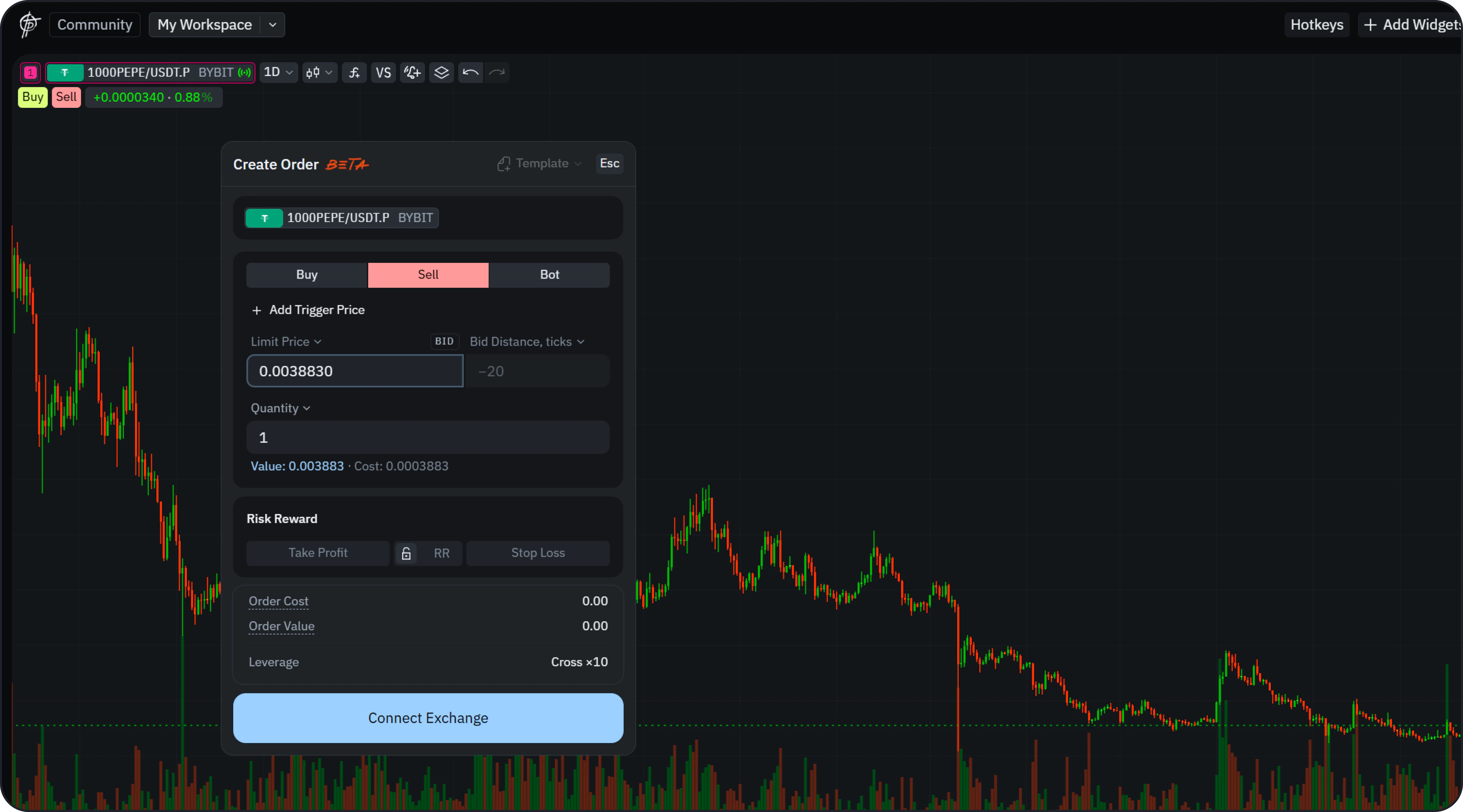 Click the **Buy** or **Sell** button in the top-left corner of the chart to open the **Create Order** panel.
If no exchange account is connected yet, you'll be prompted to link one first. See [Connect or Create an Exchange Account](/guide/trading/exchange-account).
## Supported Order Types
* **Market Order**
* **Limit Order**
## Basic Parameters
* **Side**: Buy / Sell
* **Price**: Manual input or chart-based adjustment
* **Quantity**: Position size
* **Order Value / Cost**: Auto-calculated
* **Time in Force**: Good Till Cancelled (GTC)
## Trigger Price (Conditional Logic)
You can optionally enable **Trigger Price**:
* **Last Price** — based on latest trade price
* **Mark Price** — fair price used to reduce liquidation spikes
* **Index Price** — aggregated price across exchanges
## Risk Management
Click the **Buy** or **Sell** button in the top-left corner of the chart to open the **Create Order** panel.
If no exchange account is connected yet, you'll be prompted to link one first. See [Connect or Create an Exchange Account](/guide/trading/exchange-account).
## Supported Order Types
* **Market Order**
* **Limit Order**
## Basic Parameters
* **Side**: Buy / Sell
* **Price**: Manual input or chart-based adjustment
* **Quantity**: Position size
* **Order Value / Cost**: Auto-calculated
* **Time in Force**: Good Till Cancelled (GTC)
## Trigger Price (Conditional Logic)
You can optionally enable **Trigger Price**:
* **Last Price** — based on latest trade price
* **Mark Price** — fair price used to reduce liquidation spikes
* **Index Price** — aggregated price across exchanges
## Risk Management
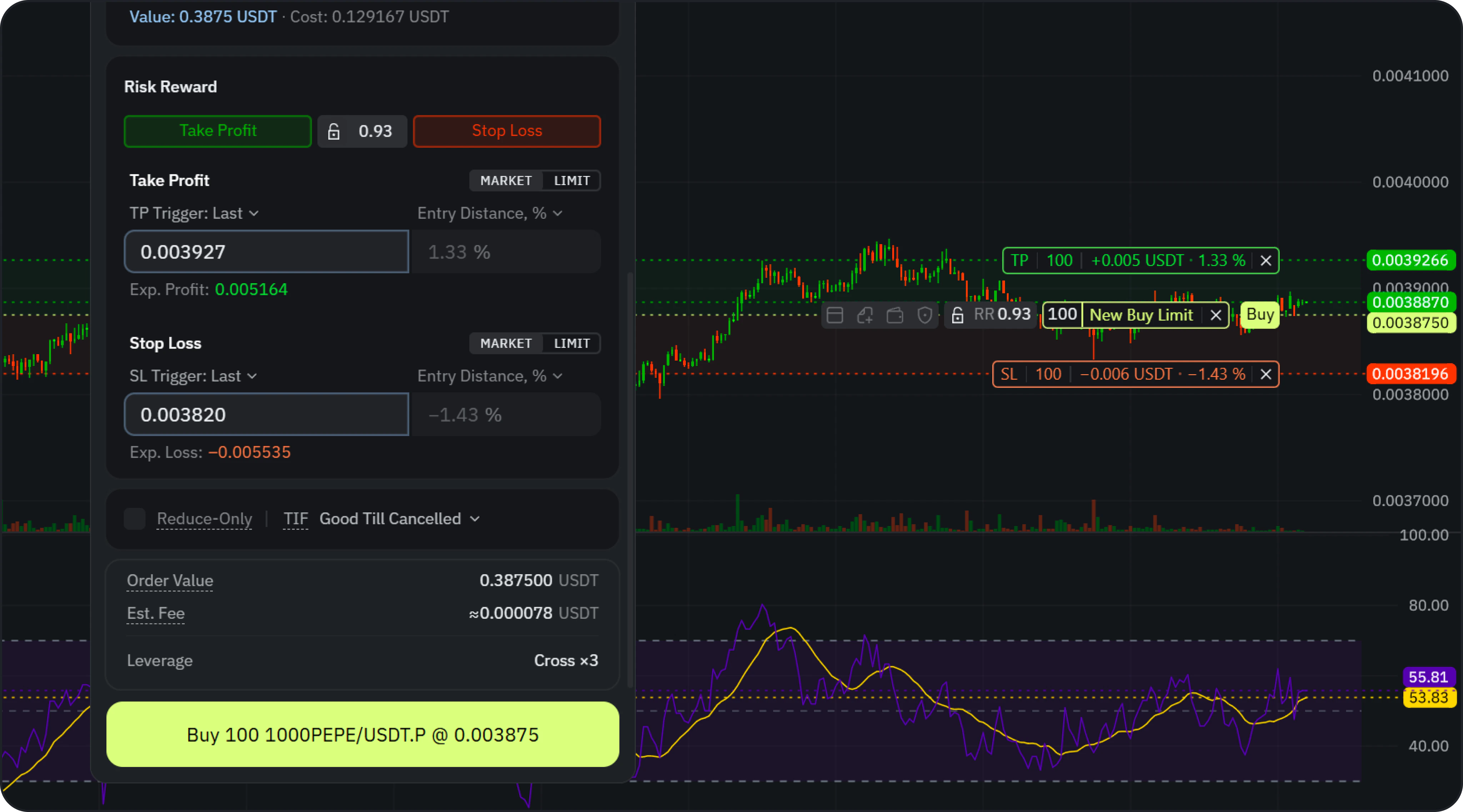 Before execution, configure your basic risk controls:
* **Take Profit**
* **Stop Loss**
* **Risk/Reward (RR)**
These parameters can be set directly in the order form or visually adjusted on the chart.
## Reduce-Only
Enable **Reduce-Only** to ensure the order strictly reduces or closes an existing position without accidentally opening a new one.
## Confirmation
Before submission, a confirmation modal will display:
* Order Price
* Quantity
* Order Cost
* Order Value
* Estimated Fee (approximate, based on exchange data)
* TP/SL levels
* Leverage
* Risk and Reward ratio
Click **Confirm** to send the order to the exchange.
## Next step
Adjust entries, TP/SL, and RR visually by dragging levels on the chart.
Before execution, configure your basic risk controls:
* **Take Profit**
* **Stop Loss**
* **Risk/Reward (RR)**
These parameters can be set directly in the order form or visually adjusted on the chart.
## Reduce-Only
Enable **Reduce-Only** to ensure the order strictly reduces or closes an existing position without accidentally opening a new one.
## Confirmation
Before submission, a confirmation modal will display:
* Order Price
* Quantity
* Order Cost
* Order Value
* Estimated Fee (approximate, based on exchange data)
* TP/SL levels
* Leverage
* Risk and Reward ratio
Click **Confirm** to send the order to the exchange.
## Next step
Adjust entries, TP/SL, and RR visually by dragging levels on the chart.